
 Mariya Abid
How to Migrate Quality Records from Excel to an eQMS
Moving quality records out of spreadsheets sounds like a file-transfer exercise. It is not. A workbook may contain open Corrective and Preventive Action (CAPA) items, document-review dates, deviation histories, supplier decisions and links to supporting evidence. If that context is lost, duplicated or changed during migration, the new system begins with unreliable information.
A successful move from Excel to an Electronic Quality Management System (eQMS) therefore starts before any upload. The organization must decide which records remain operational, which should be archived, which need correction and how every transferred item will be checked. This practical guide focuses on that migration decision—not vendor selection or the wider implementation program.
Quick Definition:
eQMS data migration is the controlled transfer of quality records and their context—including ownership, status, dates, versions and retention requirements—from spreadsheets or legacy repositories into an electronic quality data management system. A sound migration preserves meaning, traceability, accessibility and evidence that transferred records are complete and accurate.
This is your sign that your quality data management system has outgrown Excel and you should switch to an eQMS. Learn more in our article 10 Signs Your Quality System Has Outgrown Spreadsheets
1. Define the Scope of Your eQMS Data Migration
Begin with a migration charter that identifies the business owner, record types, source locations, destination modules, retention obligations, review responsibilities and acceptance criteria. Quality Assurance (QA), process owners, Information Technology (IT) and records-management or compliance representatives should agree on the scope.
Do not assume every spreadsheet belongs in the new platform. Migration should support intended workflows, not reproduce every historical folder. The Medicines and Healthcare products Regulatory Agency (MHRA) distinguishes data transfer from data migration and emphasizes preserving data and metadata so content and meaning remain unchanged. That is a useful principle even outside regulated pharmaceutical operations.
2. Inventory and Classify Excel Quality Records
Create a controlled inventory before cleaning begins. Record the file name, location, owner, process, date range, status, sensitivity, retention requirement, related evidence and known quality issues. Include shared drives, local folders, email attachments and departmental trackers; otherwise, the visible workbook may represent only part of the record.
Classify records by workflow, such as document control, CAPA, deviations, complaints, audits, training, change control and supplier quality. This reveals duplicates and dependencies—for example, an open deviation linked to a CAPA tracker and several email approvals.
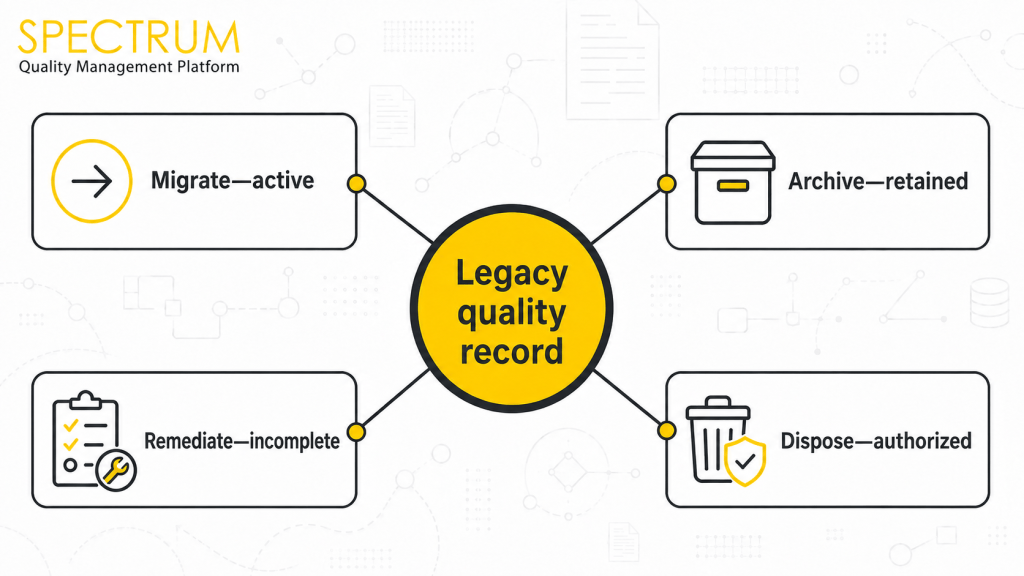
3. Decide What to Migrate, Archive or Remediate
Treat each record set according to business and regulatory need:
| Decision | Use when | Required control | Example |
| Migrate | Active or frequently referenced | Map, test and reconcile | Open CAPA actions |
| Archive | Closed but still retained | Secure, searchable access | Completed audit files |
| Remediate | Incomplete, duplicated or inconsistent | Owner review and approved correction | Missing document status |
| Dispose | Retention period has ended and disposal is authorized | Approved disposition evidence | Obsolete working copies |
Never delete records simply because they are inconvenient to migrate. Apply approved retention schedules, legal holds and organizational procedures. In regulated settings, confirm applicable predicate rules and record-retention obligations.
4. Clean and Standardize Quality Data Before Transfer
Cleaning should make inconsistencies visible without rewriting history. Standardize date formats, unique identifiers, department names, status values and controlled terminology. Resolve duplicates through documented rules. Identify blank mandatory fields, broken links, hidden worksheets, formulas, macros and comments that may not translate into the destination system.
Keep an approved copy of the original source and a transformation log. If a correction is necessary, record what changed, why, who approved it and when. The aim is not to make old data appear perfect; it is to make its condition understandable and defensible.
SEE CONTROLLED QUALITY RECORDS IN ACTION
Explore how Spectrum QMS can organize document control, CAPA, deviations and other priority workflows around searchable, traceable records.
5. Map Metadata, Relationships and Access
A row of values is not the complete record. Define how every source field maps to the eQMS: record ID, title, owner, department, effective date, status, version, approval state, due date, category, related process and retention class. Document which fields are transformed, combined, defaulted or intentionally left blank.
Map relationships as well as fields. A complaint may link to an investigation, a CAPA and a revised procedure. Access mapping also matters: spreadsheet permissions should not be copied blindly. Define destination roles using least-privilege access and segregation-of-duty requirements.
6. Configure the Destination Before Importing Records
Confirm that workflows, mandatory fields, numbering conventions, permissions and approval routes are ready before loading production records. Test templates with representative cases from different sites, departments, date ranges and quality processes. If the destination design keeps changing, imported data may need repeated transformation and retesting.
Spectrum Quality Management Software supports controlled digital workflows across document control, CAPA, audits, deviations, complaints, change control, supplier management and quality risk management. The exact migration scope should still be determined by the organization’s intended use, risk and approved implementation plan.
7. Pilot, Reconcile and Validate the Migration
Run a pilot with a small but representative dataset—not only the cleanest files. Include attachments, long text, unusual dates, inactive users, open records and cross-references. Compare source and destination results at record, field and attachment level.
Define acceptance criteria before testing. Useful checks include record counts, mandatory-field completeness, attachment availability, date and status accuracy, permission behavior, searchability and relationship integrity. Log discrepancies, investigate their cause, correct the migration rule and repeat the test. In FDA-regulated environments, electronic records and systems should be assessed against applicable requirements, including validation, audit trails, record retention and record copying under Title 21 Code of Federal Regulations (21 CFR) Part 11 and predicate rules.
8. Control Cutover and Preserve Legacy Access
Set a cutover date and define how changes made after the final source extract will be handled. Options include a short controlled freeze or a documented delta migration for new and amended records. Communicate who may update each system during the transition so teams do not create two competing versions of the truth.
After acceptance, restrict the old environment to read-only access where appropriate, preserve required records and document how authorized users can retrieve them. Do not switch off a source merely because the import completed; retirement should follow approved verification, retention and business-continuity decisions.
PLAN A CONTROLLED MOVE FROM EXCEL TO SPECTRUM
Book a demo to discuss your quality workflows, record types and migration priorities—and see how controlled digital processes can replace disconnected spreadsheets.
A Practical eQMS Migration Checklist
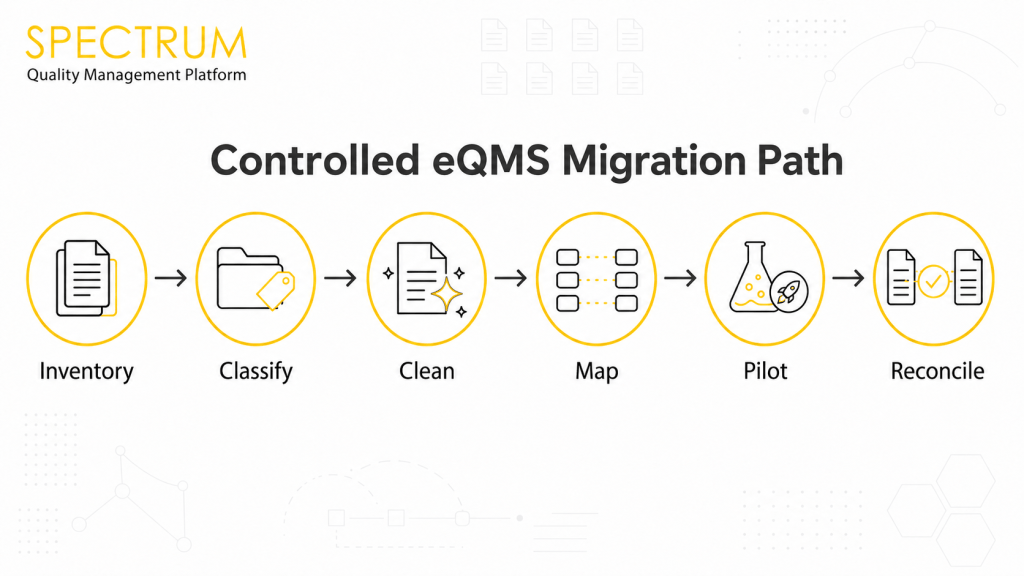
- Approve scope, owners, record types and acceptance criteria.
- Inventory spreadsheets, attachments and connected repositories.
- Classify each record set to migrate, archive, remediate or dispose.
- Standardize data and preserve an approved source copy.
- Map metadata, relationships, roles and retention requirements.
- Pilot with representative records and document discrepancies.
- Reconcile counts, fields, attachments, permissions and links.
- Control the final cutover, delta changes and legacy access.
- Train users and monitor early data-quality issues after go-live.
Conclusion
The safest migration is not the one that moves the most files. It is the one that preserves the right records, their meaning and their connections—and provides evidence that the destination is complete, accurate and usable. By making classification, mapping, reconciliation and cutover explicit, manufacturers can enter an eQMS with a cleaner foundation for controlled quality work.
Unsure whether your QMS can scale with your organization? Explore the top 5 Features of a Scalable Quality Management System and understand why your enterprise needs to level up.
Frequently Asked Questions
Prioritize active records, frequently referenced evidence and information required for operational or regulatory purposes. Closed historical records may be archived when secure access, retention and retrieval requirements can still be met.
No. Importing every workbook can reproduce duplication and poor structure. Apply approved criteria to migrate, archive, remediate or dispose of each record set.
Set acceptance criteria, test a representative pilot and reconcile source and destination record counts, fields, attachments, relationships, permissions and search results. Document discrepancies and retest corrected rules.
They can be reviewed and corrected through an approved, traceable process. Preserve the original source and document what changed, why it changed and who authorized the correction.
There is no universal duration. Timing depends on record volume, source quality, retention decisions, metadata complexity, attachments, validation needs, available reviewers and the number of modules or sites involved.
